


Sponsor content is created on behalf of and in collaboration with Flipsnack by DigitalCommerce360. Our editorial staff is not involved in the creation of the sponsored content.
Six weeks is a normal amount of time to produce a product catalog. It is how the work goes.
Ask the same team how many orders their last catalog produced, and the room goes quiet. That silence is the more useful finding.
I have spent years with the people who produce these catalogs: merchandising managers, sales operations leads, and in-house designers at distributors, importers, and manufacturers. I keep hearing the same story: 15 customers hold 15 versions of the same catalog, each out of date on the day it was sent, and nobody in the building knows which prices are still valid.
As more B2B buying moves online, the product catalog has become part of the ecommerce journey, and often the place where an order starts. Our team has analyzed enterprise catalog programs on Catalogy. Two pressures showed up everywhere, and neither is going away: ranges keep growing, and prices keep moving.
Six weeks of work, out of date on arrival
Nobody spends six weeks writing a catalog. The time goes into placing products on pages one at a time, then redoing the layout whenever a price or product changes.
Underneath sits a second problem: the product information is not in one place. It lives in a spreadsheet, in the system that runs orders, and in whatever sales last emailed. The same product gets typed into a catalog, a spec sheet, and a price sheet, and changing one changes nothing else.
What all that work produces is a static file that starts going stale the day it ships. You cannot see who opened it. Orders arrive by email, where a buyer types product codes and someone retypes them into an order system. And old copies keep circulating: teams find files 2 and 3 years old on a hard drive, still being used to quote customers.
The real cost never shows up on a budget line: the editions you never publish, the prices buyers see too late, the orders you cannot trace.
One feed, one sync, every catalog current
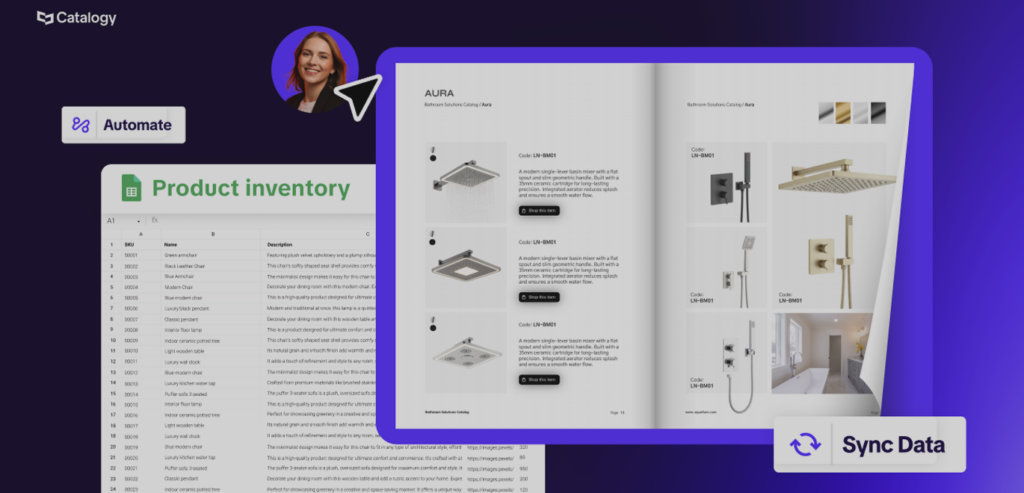
The fix starts with a template, but not a document you copy. It is a page design with slots for the product image, name, code, description, and price, plus rules for how pages reflow when the range grows. You design it once, and every product flows into it.
Then you connect the product data you already keep: a spreadsheet, a product feed, or your enterprise resource planning system. When a price moves, you update the data and sync, and every catalog built from that feed refreshes under the same link.
From there, four things change:
- There is one catalog, at one link, and it is always current.
- Buyers order inside it: products go into a cart, the order arrives structured, and the email back-and-forth is gone.
- Because every page comes from the same design, the brand holds across the whole range, including editions built for a single customer.
- Views, time on page, and orders attach to each catalog, so the next edition is built on evidence.
One master feed, a personalized catalog for every customer
Remember the 15 customers holding 15 outdated versions? The answer is not one catalog for everyone. It is 15 catalogs that never go out of date.
With personalized catalogs, a sales rep starts from the master product feed, filters it, and selects only the products one customer buys. The catalog is generated on-brand in minutes, with the customer’s logo on it, and goes out as a single link. No designer, no ticket to marketing.
When prices change, those catalogs refresh too, while each customer’s selection stays exactly as the rep picked it.
Product catalog automation across four industries
Across the full dataset analyzed from companies working by hand, they reported six weeks per edition and published three or four a year. Companies generating from data ship in under a week now and publish 12 to 16 catalogs. What follows is what four of them did, and what it produced using a digital catalog software:
A hardware and tools distributor in Latin America carries more than 10,000 stock-keeping units, and its designer had built a 181-page catalog by hand, product by product. It now runs 48 automated catalogs covering 3,957 SKUs that are up to date and generate revenue.
A five-person wholesale importer in Minnesota supplies Scandinavian home goods to hundreds of U.S. retailers. Prices on its 1,500-SKU range moved every couple of weeks, each change meaning a full rebuild. “The shoppable feature of being able to adjust one price without having to re-upload three times that’s what drew me to it,” the owner said.

An Australian pottery wholesaler received supplier information as PDFs, which meant rebuilding hundreds of pages by hand, five to 10 days per supplier. Generating from a design brought that to under 24 hours across 900 products.
A distributor operating in 20 countries had no catalog program in one market, where its trade platform carried 4,000 to 5,000 products across 19 brands. It now runs 32 automated catalogs, updated monthly with no manual page editing, according to its e-merchandising specialist.
They were looking to change how a catalog gets made. Having done that, they publish more often, their prices are right, and their buyers order without leaving the page.
[CHART — four catalog programs compared by industry, stock-keeping units carried, catalogs published and production time. Source: Flipsnack platform data, October 2024 – May 2026.]
From static catalog to sales channel
Most teams will keep accepting the six weeks, because the old way looks normal from the inside. The teams in this study had their product data in a spreadsheet or an order system. They only changed what that data was allowed to do. The question is no longer how long the catalog takes to build. It is how many orders it brings in, and whether anyone can see them.
About the author
Bogdan Mile is Chief Product Officer at Flipsnack, a digital publishing platform with 14 years of experience working with enterprise companies, and leads Catalogy, the Flipsnack brand built specifically for product catalogs. He has led product at the company since 2018, working directly with catalog, merchandising, and sales operations teams to map how catalog production and ordering run inside their businesses, and building the automation that replaces the manual work. Connect with him on LinkedIn.